2024/08/22
从今天开始,正式准备启动这个“项目”啦!(其实已经看过一段时间前面的基础介绍了
希望能够坚持做完!!!(ง •_•)ง
这里主要记录一下做PA过程中遇到的问题和思考(以及内心戏
不过后面一个月要去外地培训了。。。还不知道弄
1. PA1
1.3 RTFSC
getopt_long()函数的作用?
1 | SYNOPSIS |
got,用来解析命令行参数的。
1.3.1 准备第一个客户程序
为什么全部都是函数?
阅读
init_monitor()函数的代码, 你会发现里面全部都是函数调用. 按道理, 把相应的函数体在init_monitor()中展开也不影响代码的正确性. 相比之下, 在这里使用函数有什么好处呢?这样有利于抽象内部设计,使得设计更加层次分明
2024/08/23
NEMU是一个用来执行客户程序的程序(模拟计算机),但是NEMU一开始并没有客户程序(OS或其他客户程序),需要有程序将客户程序读入计算机中,NEMU项目src中的monitor就是用来干这个事的(也包含调试的功能sdb)。
monitor中调用init_isa()来进行ISA的一些初始化:
- 将一个内置客户程序读入内存中
- 初始化虚拟计算机系统(初始化寄存器,
restart()函数)
读入客户程序到内存中,读到什么位置?NEMU采用最简单的方式——约定一个位置,可由我们配置,定义在nemu/include/memory/paddr.h中,定义为RESET_VECTOR。
NEMU默认提供128MB的内存,模拟内存定义在src/memory/paddr.c中,定义为pmem
RISC-V32(以及MIPS32)的默认物理内存地址是从
0x80000000开始编址的, 将来CPU访问内存时, 会将CPU将要访问的内存地址映射到pmem中的相应偏移位置,这是通过nemu/src/memory/paddr.c中的guest_to_host()函数实现的。
可能这个RESET_VECTOR就相当于真实计算机启动的第一个地址?存放BIOS的位置?

成功运行!!!
2024.10.26记
果然。。。中途荒废了一个月再捡起来就需要勇气了hhh,
荒废了两个月后,我终于又准备回来了!
2024.12.15记
真的回来了(
2024/12/15
NEMU最开始默认的客户程序定义在init.c函数中,如下:
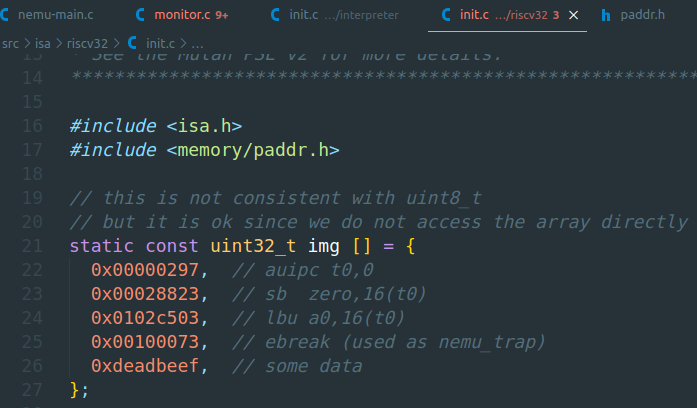
其中的img就是4条指令+一个数据。也可以在运行NEMU的时候添加一个参数,指定外部的镜像文件加载。
1.3.2 运行第一个客户程序
究竟要执行多久?
在
cmd_c()函数中, 调用cpu_exec()的时候传入了参数-1, 你知道这是什么意思吗?A:将-1转换成uint64_t的最大值,即执行0xFFFFFFFFFFFFFFFF这么多条指令(如不是指令自行退出的话)
潜在的威胁 (建议二周目思考)
“调用
cpu_exec()的时候传入了参数-1“, 这一做法属于未定义行为吗? 请查阅C99手册确认你的想法。A:好的,那就二周目再思考(
进入sdb_mainloop()函数后,会通过cmd_table结构体中的函数指针(handler)来调用不同的函数,输入c就可以运行内置的img。但是再次输入c的话会提示需要重新运行NEMU才能。。。
sdb_mainloop()函数中的strtok()函数是用来分割字符串的,类似python的split函数,可以指定分割标志。
有意思的是其中的nemu_trap指令,它是为了在NEMU中让客户程序指示执行的结束而加入的, NEMU在ISA手册中选择了一些用于调试的指令, 并将nemu_trap的特殊含义赋予它们。例如在riscv32的手册中, NEMU选择了ebreak指令来充当nemu_trap. 为了表示客户程序是否成功结束, nemu_trap指令还会接收一个表示结束状态的参数。
RTFM:
RISC-V的基础指令格式有如下4种:
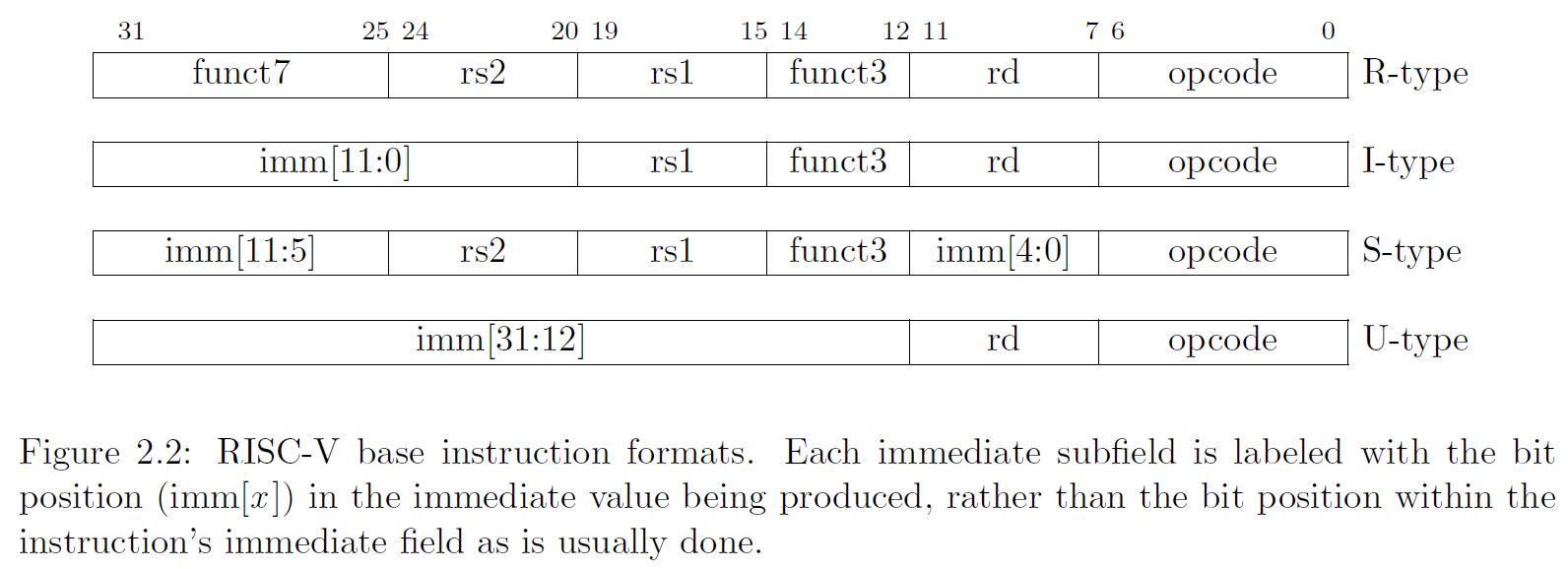
RISC-V中,EBREAK指令可以用SYSTEM指令实现,如下:
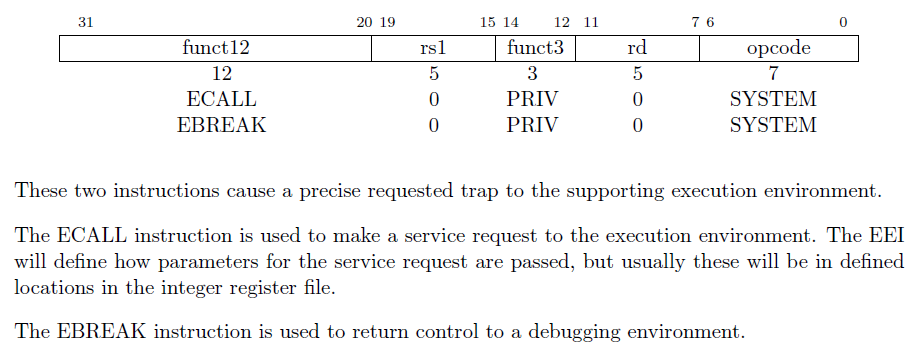
ECALL和EBREAK的功能都是在SYSTEM这个opcode下实现的,ECALL的funct12是0,EBREAK的funct12是1。
其中,EBREAK是用于将控制权返回给调试环境。
NEMU中,EBREAK指令的实现是将nemu_state.state置为NEMU_END,将nemu_state.halt_pc置为当前PC,将nemu_state.halt_ret置为10。
Note:
什么是trap?
问了一下GPT:
Trap 是指在程序执行过程中,处理器遇到某些事件时,将控制权从当前程序转移到操作系统或异常处理程序的一种机制。
它可以由程序主动触发(如系统调用),也可以由硬件自动触发(如异常或中断)。so,基本上就是用来切换执行的代码流的(个人理解)。
谁来指示程序的结束?
在程序设计课上老师告诉你, 当程序执行到
main()函数返回处的时候, 程序就退出了, 你对此深信不疑. 但你是否怀疑过, 凭什么程序执行到main()函数的返回处就结束了? 如果有人告诉你, 程序设计课上老师的说法是错的, 你有办法来证明/反驳吗? 如果你对此感兴趣, 请在互联网上搜索相关内容。STFW:在程序终止前,可能会存在一些清理操作,例如关闭打开的文件、释放分配的内存等。这些清理操作可以在主函数的最后部分执行,调用
atexit()函数即可。有始有终 (建议二周目思考)
对于GNU/Linux上的一个程序, 怎么样才算开始? 怎么样才算是结束? 对于在NEMU中运行的程序, 问题的答案又是什么呢?
与此相关的问题还有: NEMU中为什么要有
nemu_trap? 为什么要有monitor?对于下面的问题,一周目的回答:为了暂停/终止当前程序的执行,将CPU的控制权交给其他程序(OS/monitor),monitor是用来调试的(吧。。
代码中有一些值得注意(学习),直接摘抄过来:
三个对调试有用的宏(在
nemu/include/debug.h中定义)
Log()是printf()的升级版, 专门用来输出调试信息, 同时还会输出使用Log()所在的源文件, 行号和函数. 当输出的调试信息过多的时候, 可以很方便地定位到代码中的相关位置Assert()是assert()的升级版, 当测试条件为假时, 在assertion fail之前可以输出一些信息panic()用于输出信息并结束程序, 相当于无条件的assertion fail内存通过在
nemu/src/memory/paddr.c中定义的大数组pmem来模拟. 在客户程序运行的过程中, 总是使用vaddr_read()和vaddr_write()(在nemu/src/memory/vaddr.c中定义)来访问模拟的内存. vaddr, paddr分别代表虚拟地址和物理地址.优美地退出
为了测试大家是否已经理解框架代码, 我们给大家设置一个练习: 如果在运行NEMU之后直接键入
q退出, 你会发现终端输出了一些错误信息. 请分析这个错误信息是什么原因造成的, 然后尝试在NEMU中修复它.
终于有一个练习了!
在NEMU中直接输入q和输入c之后再输入q的结果确实不一样!如下:
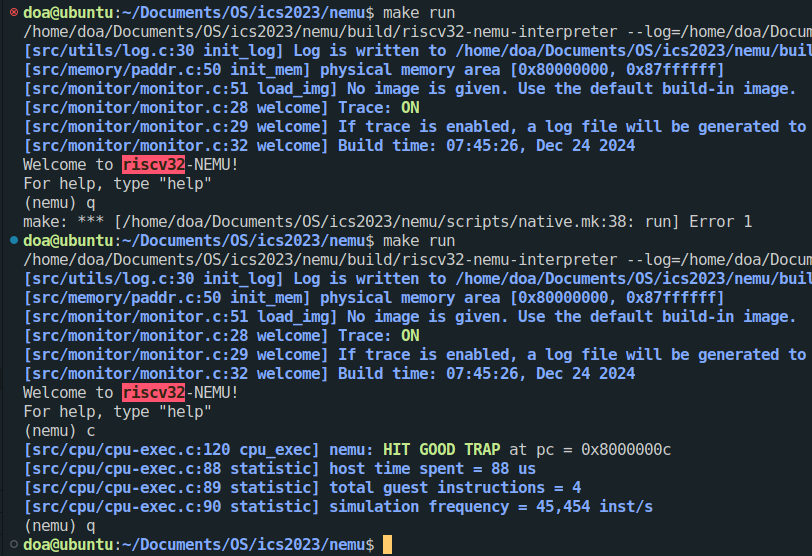
输入c之后再输入q能够优雅地退出,并没有报错,而直接输入则会报错。通过echo $?查看程序的返回值,发现直接退出的返回值是2,而正常的是0,所以问题出在返回值上。
PS:在menu里开启debug配置后,输入make gdb,可以调试NEMU
一个疑惑是,进入gdb调试后,发现直接退出返回的值是1,并不是2!这是为什么呢?值得思考,怀疑是make程序进行了再次返回,于是直接在命令行运行NEMU而不是通过make命令,得到以下结果:
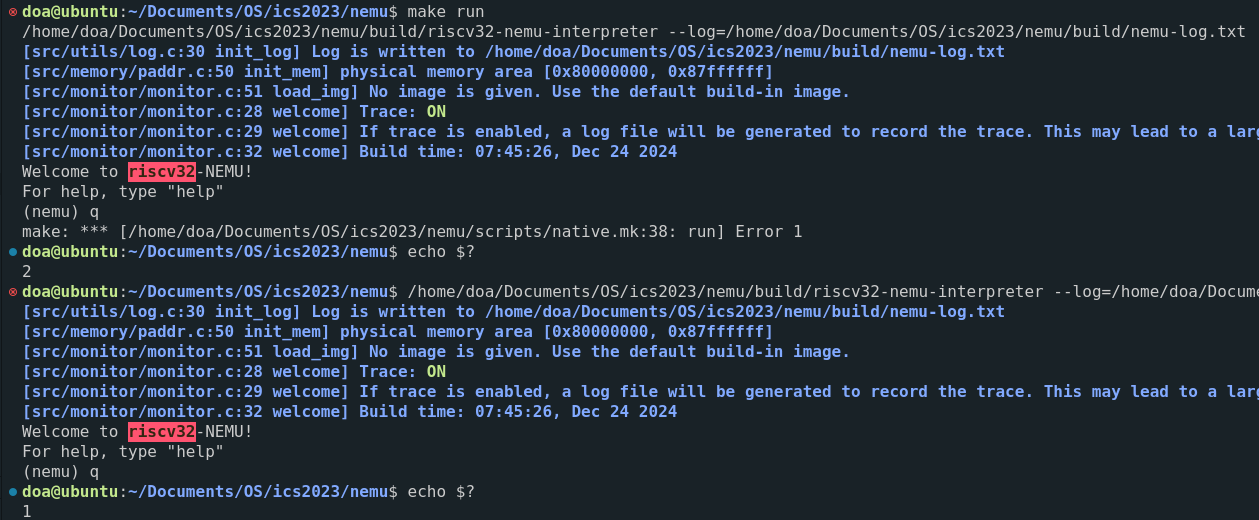
猜想正确。(还可以深究一下为什么make会在返回值1的基础上返回2?
不过,程序会报错的原因找到了,就是因为返回值不为0,而控制返回值的函数在/src/utils/state.c中的函数is_exit_status_bad():
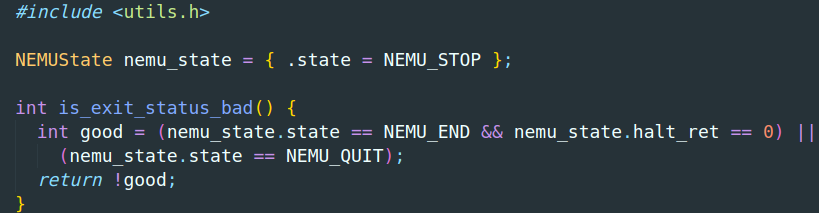
说明退出时不满足这个条件,返回去看sdb_mainloop()函数中的调用逻辑,运行c命令的话,会执行img程序,会使得nemu_state满足good表达式中的前一个条件,而直接输入q则直接返回-1,不会修改nemu_state的状态,于是不满足good的条件,所以为0,返回1,于是修改调用的cmd_q()函数,设置nemu_state的状态为NEMU_QUIT,即可实现“优雅地退出”。
事实上, TRM的实现已经都蕴含在上述的介绍中了.
- 存储器是个在
nemu/src/memory/paddr.c中定义的大数组- PC和通用寄存器都在
nemu/src/isa/$ISA/include/isa-def.h中的结构体中定义- 加法器在… 嗯, 这部分框架代码有点复杂, 不过它并不影响我们对TRM的理解, 我们还是在PA2里面再介绍它吧
- TRM的工作方式通过
cpu_exec()和exec_once()体现
1.4 基础设施
免责声明(不是
后续内容有很多是直接摘抄自NEMU的官方文档,每次都说明的话出来太麻烦且不啰嗦
所以,在这里声明,如有雷同,就是我“抄”过来的(保命
1.4.1. 简易调试器
目标是实现sdb的以下一些功能:
| 命令 | 格式 | 使用举例 | 说明 |
|---|---|---|---|
| 帮助(1) | help |
help |
打印命令的帮助信息 |
| 继续运行(1) | c |
c |
继续运行被暂停的程序 |
| 退出(1) | q |
q |
退出NEMU |
| 单步执行 | si [N] |
si 10 |
让程序单步执行N条指令后暂停执行, 当N没有给出时, 缺省为1 |
| 打印程序状态 | info SUBCMD |
info r info w |
打印寄存器状态 打印监视点信息 |
| 扫描内存(2) | x N EXPR |
x 10 $esp |
求出表达式EXPR的值, 将结果作为起始内存 地址, 以十六进制形式输出连续的N个4字节 |
| 表达式求值 | p EXPR |
p $eax + 1 |
求出表达式EXPR的值, EXPR支持的 运算请见调试中的表达式求值小节 |
| 设置监视点 | w EXPR |
w *0x2000 |
当表达式EXPR的值发生变化时, 暂停程序执行 |
| 删除监视点 | d N |
d 2 |
删除序号为N的监视点 |
CPU_state的定义在相应isa的include/isa-def.h中:
1 | typedef struct { |
其中gpr就是general purpose register的意思,pc是程序指针。
解析命令
这里有两个函数很好用:
- strtok():分割字符串
- sscanf():输入是字符串,从中获取格式化输入
具体用法可以STFW or RTFM
单步执行
略。
PS:并不是我懒,是我相信你可以的!
打印寄存器
同上
扫描内存
这里读取的是物理内存(pmem)。riscv32的物理地址是从0x80000000开始的,NEMU框架已经提供了一个paddr_read()函数来读取对应的地址数据。
1.4.2. 表达式求值
!!!前排提示!!!
大的要来了!这一小节应该会有难度。
在这里使用如下方法来解决表达式求值的问题:
- 首先识别出表达式中的单元
- 根据表达式的归纳定义进行递归求值
词法分析
词法分析就是识别出表达式中的单元,它们正式的称呼叫token。例子:
1 | "5 + 4 * 3 / 2 - 1" |
其中,数字5等,符号+,*等都是token(除了空格)。
秘密武器:正则表达式
先只考虑一种简单的情况:算术表达式,即待求值表达式中只允许出现以下的token类型:
- 十进制整数
+,-,*,/(,)- 空格串(一个或多个空格)
sdb/expr.c中,下面这个代码:
static Token tokens[32] __attribute__((used)) = {};中的
__attribute__((used))是告诉编译器:即使这个tokens数组在程序中好像没被用到,也不要优化掉它,这个是GCC / Clang 编译器的扩展语法。为什么要加这个?
因为NEMU中有很多变量都是用来被 monitor/debug/反射访问的。
什么是反射访问?
就是程序在运行时,根据名字动态查找、访问内部变量或者函数,而不是硬编码在源代码里。
C 语言本身没有内建反射机制,但可以通过 手动建表 + 符号查找来“模拟反射”。
一个反射访问的例子:
2
3
4
5
6
7
8
9
10
11
12
13
14
15
16
17
18
const char* name;
void* addr;
} VarEntry;
VarEntry variables[] = {
{"x", &x},
{"y", &y},
{"z", &z},
};
void* lookup(const char* name) {
for (int i = 0; i < sizeof(variables)/sizeof(variables[0]); ++i) {
if (strcmp(variables[i].name, name) == 0)
return variables[i].addr;
}
return NULL;
}这样就可以通过变量名字”x”去查找变量
x的实际地址了。为什么要有这样的机制?
为了实现变量的动态访问,特别是NEMU中,例如,
sdb_mainloop()函数中处理用户输入,来选择调用不同的函数。或许后面会遇到的,根据用户输入的寄存器名来访问相应的寄存器值。所以加了
__attribute__((used))的静态变量,实际上是要被反射访问的。编译器表面上看不到调用,但是运行时需要靠查表、字符串匹配去访问!小技巧
又学到一个小技巧:
Log("... %.*s", substr_len, substr_start)。底层对应的printf函数。这里面的
%.*s其实对应的是最后的两个参数:substr_len, substr_start,分别表示要打印的字符数和字符串起始地址。这样就可以不用管\0字符在哪里了。
2. PA2
2.1. 不停计算的机器
最简单的图灵计算机的工作方式:
1 | while (1) { |
虽然根据不同CPU的流水线设计不同而有区别,对于大部分指令来说,执行它们都可以抽象成取指-译码-执行的指令周期。
具体可以看一下我之前的一篇CPU简单介绍:
2.2. RTFSC
RTFSC(2)
这里没有啥需要我再次解释的,直接看官方文档就行RTFSC(2) · GitBook。
PS:我发现2023版本的文档挂了。。。也不知道为啥
需要注意一下的概念就是snpc和dnpc了,前者是static next PC,后者是dynamic next PC的意思,static就是当前PC的地址上紧挨着的下一条指令的地址,是当前PC加上固定长度后的值。后者是逻辑上下一条需要执行的指令地址,因为程序执行的过程中可能会有许多分支,比如使用if或者函数调用的情况,这两个概念在CPU设计中算是很重要的。
立即数背后的故事
Q: Motorola 68k系列的处理器都是大端架构的. 现在问题来了, 考虑以下两种情况:
- 假设我们需要将NEMU运行在Motorola 68k的机器上(把NEMU的源代码编译成Motorola 68k的机器码)
- 假设我们需要把Motorola 68k作为一个新的ISA加入到NEMU中
在这两种情况下, 你需要注意些什么问题? 为什么会产生这些问题? 怎么解决它们?
A: 这两个问题的根本是要弄清楚Host ISA和Guest ISA。Host ISA是运行NEMU的机器的ISA,Guest ISA是被模拟的ISA。
第一种情况,Host ISA就是Motorola 68K,需要注意的是实现NEMU模拟器本身的代码中,所有使用指针直接访问地址的地方,例如(uint8_t *),在这个地址基础上使用加法访问其他地址操作的时候,需要注意大小端是否正确,因为编译器编译到目标机器上肯定都是根据目标机器的大小端来生成的。
第二种情况,Guest ISA是Motorola 68K,Host ISA根据各自运行的机器而定,目前大部分都应该是x86吧,那么就是小端机器。Guest程序会被编译成Motorola 68K的大端形式,然后我们在NEMU中取指和译码的时候就需要注意大小端问题。
立即数背后的故事(2)
Q: mips32和riscv32的指令长度只有32位, 因此它们不能像x86那样, 把C代码中的32位常数直接编码到一条指令中. 思考一下, mips32和riscv32应该如何解决这个问题?
A: 一条指令不行,那就两条指令撒。实际也是这么做的,以RISCV32为例,32位常数一般是用LUI和ADDI指令实现的,LUI先复制高20bit的数,ADDI加上剩余的低12bit数即可。
为什么执行了未实现指令会出现上述报错信息
Q: RTFSC, 理解执行未实现指令的时候, NEMU具体会怎么做。
A: 可以先理解一下decode.h里面的这三个宏定义:
1 | // --- pattern matching wrappers for decode --- |
这里主要就是运用了标签和goto这两个概念:C goto 语句 | 菜鸟教程
虽然现代C/C+++并不建议使用这两个东西,但是在这里,这种方式非常好的实现了一个解析指令的wrapper。
然后看inst.c文件中的decode_exec函数,其中的:
1 | INSTPAT_START(); |
展开之后的结构就是:
1 | const void **__instpat_end = &&__instpat_end_; |
关于START和END这两个宏的原理,可以去了解一下GNU的labels-as-values这个概念:【GNU笔记】【C扩展系列】标签作为值_labels as values-CSDN博客
跑的有些远了,前面是让想让我们理解代码逻辑,然后回到问题本身:理解执行未实现指令的时候, NEMU具体会怎么做?
按照代码逻辑,最后一个INSTPAT定义如下:
1 | INSTPAT("??????? ????? ????? ??? ????? ????? ??", inv , N, INV(s->pc)); |
而INV宏定义如下:
1 |
所以最终会转到invalid_inst这个函数里,会报出invalid instruction的错误提示。
需要注意的是,这条INSTPAT一定要放在最后,否则会导致正常指令不能被解析匹配,因为前面的解析都是if逻辑。
指令名对照
Q: AT&T格式反汇编结果中的少量指令, 与手册中列出的指令名称不符, 如x86的
cltd, mips32和riscv32则有不少伪指令(pseudo instruction). 除了STFW之外, 你有办法在手册中找到对应的指令吗? 如果有的话, 为什么这个办法是有效的呢?
A: 指令集官方文档里一般有相关的pseudo code/pseudo instruction表格,可以搜索相关关键词。或者可以查看编译器的官方文档。没有的话,只能看指令本身的编码来反查指令名了,比如通过opcode。
2.3. 程序, 运行时环境与AM
2.3.1. 运行时环境
直接引用原文档:
“应用程序的运行都需要运行时环境的支持, 包括加载, 销毁程序, 以及提供程序运行时的各种动态链接库(你经常使用的库函数就是运行时环境提供的)等. 为了让客户程序在NEMU中运行, 现在轮到你来提供相应的运行时环境的支持了.
根据KISS法则, 我们先来考虑最简单的运行时环境是什么样的. 换句话说, 为了运行最简单的程序, 我们需要提供什么呢? 其实答案已经在PA1中了: 只要把程序放在正确的内存位置, 然后让PC指向第一条指令, 计算机就会自动执行这个程序, 永不停止.
不过, 虽然计算机可以永不停止地执行指令, 但一般的程序都是会结束的, 所以运行时环境需要向程序提供一种结束运行的方法. 聪明的你已经能想到, 我们在PA1中提到的那条人工添加的
nemu_trap指令, 就是让程序来结束运行的.所以, 只要有内存, 有结束运行的方式, 加上实现正确的指令, 就可以支撑最简单程序的运行了. 而这, 也可以算是最简单的运行时环境了.”
2.3.2. 将运行时环境封装成库函数
依旧直接引用,原文已经足够好:
我们刚才讨论的运行时环境是直接位于计算机硬件之上的, 因此运行时环境的具体实现, 也是和架构相关的. 我们以”ISA-平台”的二元组来表示一个架构, 例如
mips32-nemu. 以程序结束为例, NEMU中是使用特殊的nemu_trap指令, 而不同ISA的nemu_trap指令的格式肯定不同; 但如果我们自己用verilog设计了一个riscv32 CPU, 这个riscv32-mycpu的架构, 有可能是通过一条mycpu_trap指令来结束程序, 它和nemu_trap指令可能是不一样的. 而结束运行是程序共有的需求, 为了让n个程序运行在m个架构上, 难道我们要维护n*m份代码? 有没有更好的方法呢?对于同一个程序, 如果能把
m个版本不同的部分都转换成相同的代码, 我们就只需要维护一个版本就可以了. 而实现这个目标的杀手锏, 就是你在程序设计课上学过的抽象! 我们只需要定义一个结束程序的API, 比如void halt(), 它对不同架构上程序的不同结束方式进行了抽象: 程序只要调用halt()就可以结束运行, 而不需要关心自己运行在哪一个架构上. 经过抽象之后, 之前m个版本的程序, 现在都统一通过halt()来结束运行, 我们就只需要维护这一个通过halt()来结束运行的版本就可以了. 然后, 不同的架构分别实现自己的halt(), 就可以支撑n个程序的运行! 这样以后, 我们就可以把程序和架构解耦了: 我们只需要维护n+m份代码(n个程序和m个架构相关的halt()), 而不是之前的n*m.这个例子也展示了运行时环境的一种普遍的存在方式: 库. 通过库, 运行程序所需要的公共要素被抽象成API, 不同的架构只需要实现这些API, 也就相当于实现了支撑程序运行的运行时环境, 这提升了程序开发的效率: 需要的时候只要调用这些API, 就能使用运行时环境提供的相应功能.
抽象和封装最主要的作用就是把软件和硬件解耦了,不需要为每个硬件编写不同的程序,方便程序的移植和分发。
2.3.3. AM - 裸机(bare-metal)运行时环境
AM(Abstract machine)项目就是这样诞生的. 作为一个向程序提供运行时环境的库, AM根据程序的需求把库划分成以下模块
AM = TRM + IOE + CTE + VME + MPE
TRM(Turing Machine) - 图灵机, 最简单的运行时环境, 为程序提供基本的计算能力
IOE(I/O Extension) - 输入输出扩展, 为程序提供输出输入的能力
CTE(Context Extension) - 上下文扩展, 为程序提供上下文管理的能力
VME(Virtual Memory Extension) - 虚存扩展, 为程序提供虚存管理的能力
MPE(Multi-Processor Extension) - 多处理器扩展, 为程序提供多处理器通信的能力 (MPE超出了ICS课程的范围, 在PA中不会涉及)
AM给我们展示了程序与计算机的关系: 利用计算机硬件的功能实现AM, 为程序的运行提供它们所需要的运行时环境. 感谢AM项目的诞生, 让NEMU和程序的界线更加泾渭分明, 同时使得PA的流程更加明确:
2
>(在NEMU中)实现更强大的硬件功能 -> (在AM中)提供更丰富的运行时环境 -> (在APP层)运行更复杂的程序为什么要有AM? (建议二周目思考)
Q: 操作系统也有自己的运行时环境. AM和操作系统提供的运行时环境有什么不同呢? 为什么会有这些不同?
A: 还在单周目的我斗胆提前”猜想”一下,操作系统提供的运行时环境与OS软件本身设计的特性有关,而AM提供的运行时环境是与硬件的特性有关,抽象的层级不同。
2.3.4. RTFSC(3)
整个AM项目分为两大部分:
abstract-machine/am/- 不同架构的AM API实现, 目前我们只需要关注NEMU相关的内容即可. 此外,abstract-machine/am/include/am.h列出了AM中的所有API, 我们会在后续逐一介绍它们.abstract-machine/klib/- 一些架构无关的库函数, 方便应用程序的开发阅读
abstract-machine/am/src/platform/nemu/trm.c中的代码, 你会发现只需要实现很少的API就可以支撑起程序在TRM上运行了:
Area heap结构用于指示堆区的起始和末尾void putch(char ch)用于输出一个字符void halt(int code)用于结束程序的运行void _trm_init()用于进行TRM相关的初始化工作
2.3.5. 实现常用的库函数
一种好的做法是把运行时环境分成两部分: 一部分是架构相关的运行时环境, 也就是我们之前介绍的AM; 另一部分是架构无关的运行时环境, 类似
memcpy()这种常用的函数应该归入这部分,abstract-machine/klib/用于收录这些架构无关的库函数.klib是kernel library的意思, 用于提供一些兼容libc的基础功能。
实现string.c文件中的字符串处理函数,难度不大,大家自行搜索相关文档然后按照描述完成。
需要注意,未定义行为这个概念。这里有个关于编译器利用未定义行为进行优化的文章:
homes.cs.washington.edu/~akcheung/papers/apsys12.pdf
stdarg是如何实现的?
stdarg.h中包含一些获取函数调用参数的宏, 它们可以看做是调用约定中关于参数传递方式的抽象. 不同ISA的ABI规范会定义不同的函数参数传递方式, 如果让你来实现这些宏, 你会如何实现?
stdarg.h里最重要的就是这三个宏了:
1 |
其中va_start是负责初始化 va_list,让输入参数v指向第一个可变参数,l是指向最后一个固定参数。
va_arg的功能是读取当前参数,并移动到下一个参数。
va_end的功能是结束变参访问,释放相关资源。
至于__builtin_开头的这些函数,是GCC的内置函数,得去看编译器源码,我们暂时先当作黑盒吧,他们就是编译器把不同ISA的ABI(Application Binary Interface)包装出来的一层抽象。
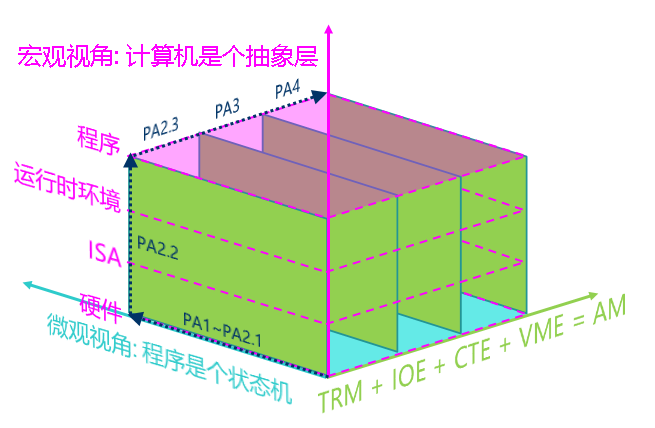
2.3.6. 重新认识计算机: 计算机是个抽象层
我们先来讨论在TRM上运行的程序, 我们对这些程序的需求进行分类, 来看看我们的计算机系统是如何支撑这些需求的.
TRM 计算 内存申请 结束运行 打印信息 运行环境 - malloc()/free() - printf() AM API - heap halt() putch() ISA接口 指令 物理内存地址空间 nemu_trap指令 I/O方式 硬件模块 处理器 物理内存 Monitor 串口 电路实现 cpu_exec() pmem[] nemu_state serial_io_handler() “程序在计算机上运行”的宏观视角: 计算机是个抽象层
每一层抽象都有它存在的理由:
- 概念相同的一个硬件模块有着不同的实现方式, 比如处理器既可以通过NEMU中简单的解释方式来实现, 也可以通过类似QEMU中高性能的二进制翻译方式来实现, 甚至可以通过verilog等硬件描述语言来实现一个真实的处理器.
- ISA是硬件向软件提供的可以操作硬件的接口
- AM的API对不同ISA(如x86/mips32/riscv32)的接口进行了抽象, 为上层的程序屏蔽ISA相关的细节
- 运行时环境可以通过对AM的API进行进一步的封装, 向程序提供更方便的功能
2.4. 基础设施2
2.4.1. bug诊断的利器 - 踪迹
在软件工程领域, 记录程序执行过程的信息称为踪迹(trace)). 有了踪迹信息, 我们就可以判断程序的执行过程是否符合预期, 从而进行bug的诊断.
2.4.1.2. 指令环形缓冲区 - iringbuf
这个实现一个环形缓冲buf就行,so easy。
2.4.1.4. 函数调用的踪迹
需要解析ELF文件,首先可以看一下ELF的格式,使用:man 5 elf。
我们要在初始化ftrace时从ELF文件中读出符号表和字符串表,供后续使用。
ELF文件中包括许多的section,其中我们需要用到的section有如下3个:
1 | .shstrtab |
.shstrtab保存的是section name;.strtab保存的是符号表中需要用到的字符串,也就是字符串表;.symtab保存的是符号相关的信息,就是我们说的符号表。
实现ftrace的思路如下:
- 提前通过符号表和字符串表解析出来各个函数对应的地址(和范围)
- 在执行
jal和jalr指令的时候,判断跳转的地址是否在第1步中解析出来的函数中。- 如果是,则打印信息
- 如果不是,则不打印
ELF文件的最开始是一个ELF Header结构体:
1 | typedef struct { |
其中,e_shoff表示的是section header table(sht)在文件中的字节偏移,可以通过它直接定位到sht。
然后,e_shstrndx是sht中字符串表的下标,可以通过它定位到字符串表。
最后,我们需要找到符号表,找到符号表才能找到相应的函数符号。
其中
e_shnum是sht数组的大小,即多少项。e_shentsize是每一项的大小。这两个是用来辅助解析sht的。
我们还需要知道的是,符号表每一项的结构体如下:
1 | typedef struct { |
其中st_info指示的是这个符号的类型,如果是它的值是STT_FUNC,那么就表示这个符号是一个函数名。
一个小坑需要注意,
st_info这个成员不只是符号的类型,还有binding信息,所以还需要通过一个宏ELF32_ST_TYPE(info)来将st_info转换成TYPE类型再和STT_FUNC对比判断。
RISC-V架构中,函数的调用和返回都是通过jal或jalr指令来实现的,前者是直接跳转指令,后者是间接跳转指令。
一个典型的ELF文件的大致内容如下:
1 | +---------------------------+ |
实现初版的ftrace后,运行得到的结果如下:
1 | 0x8000000c: call [_trm_init@0x80000258] |
消失的符号
我们在
am-kernels/tests/cpu-tests/tests/add.c中定义了宏NR_DATA, 同时也在add()函数中定义了局部变量c和形参a,b, 但你会发现在符号表中找不到和它们对应的表项, 为什么会这样?思考一下, 什么才算是一个符号(symbol)?
A:
宏定义根本不是一个符号,他在预处理阶段就被展开了,所以编译器根本不知道它的存在。
局部变量由于没有被外部调用,只是一个临时的变量,不一定需要用符号来表示存在,汇编语言中可以直接用寄存器来表示。
什么才算一个符号?
从链接的角度:符号是一个能够被其他位置引用、需要在目标文件之间建立关联关系的名字。比如全局变量,或者函数。
寻找”Hello World!”
在Linux下编写一个Hello World程序, 编译后通过上述方法找到ELF文件的字符串表, 你发现”Hello World!”字符串在字符串表中的什么位置? 为什么会这样?
A:如果hello world程序是下面这样的:
1 |
|
那么这个Hello world是在.rodata section里面,因为.strtab保存的是符号表中需要用到的字符串,而链接器不需要通过符号找到这个字符串。即使你定义了一个全局指针指向这个字符串,那么在字符串表里的也是这个指针的名字,而不是Hello world本身。
不匹配的函数调用和返回
Q:如果你仔细观察上文recursion的示例输出, 你会发现一些有趣的现象. 具体地, 注释(1)处的ret的函数是和对应的call匹配的, 也就是说, call调用了f2, 而与之对应的ret也是从f2返回; 但注释(2)所指示的一组call和ret的情况却有所不同, call调用了f1, 但却从f0返回; 注释(3)所指示的一组call和ret也出现了类似的现象, call调用了f1, 但却从f3返回。尝试结合反汇编结果, 分析为什么会出现这一现象.
A:尾调用优化,在函数结尾简单地调用另一个函数的话,会触发编译器的尾调用优化。这里的“简单”是指仅仅调用另一个函数,而不会在调用后对返回值进行处理,例如f2函数中的“+9”。所以我们可以观察到,不匹配的call和ret是固定组合:
- call f1, ret f3
- call f1, ret f0
- call f0, ret f3 (这个是最外面一层call ret对)
还有一个“奇怪的”点,你可以观察到,最开始的第一个call f0函数后,call的是f2,而不是代码中的f3。实际上这也是尾调用优化的一个影响,实现尾调用的话,不需要保存返回地址到ra寄存器,而我们实现的ftrace是按照是否保存返回地址到ra判断是否是call指令的,因此,要实现真正的ftrace,还需要对jal/jalr指令进行判断,不能仅仅看是否保存地址到ra。所以目前实现的ftrace仅仅是简单版本。
通过看反汇编结果,可以发现f0和f1中调用其他两个函数的语句都是jr,即最简单的无条件跳转,并没有保存返回地址,所以从这两个函数出发去调用其他函数之后,会产生没有匹配的ret的情况。而f2和f3中的调用都是jalr指令,会保存返回地址,所以ftrace能够匹配。
关于尾调用优化(TCO)的解释,推荐一个视频:
https://www.bilibili.com/video/BV1Pb421Y7uP
冗余的符号表
在Linux下编写一个Hello World程序, 然后使用
strip命令丢弃可执行文件中的符号表:
2
strip -s hello用
readelf查看hello的信息, 你会发现符号表被丢弃了, 此时的hello程序能成功运行吗?目标文件中也有符号表, 我们同样可以丢弃它:
2
strip -s hello.o用
readelf查看hello.o的信息, 你会发现符号表被丢弃了. 尝试对hello.o进行链接:
你发现了什么问题? 尝试对比上述两种情况, 并分析其中的原因.
strip掉可执行文件中的符号表依然可以执行,但是strip掉目标文件中的符号表后再链接就会报错:
1 | /usr/bin/ld: error in test.o(.eh_frame); no .eh_frame_hdr table will be created |
这是因为符号表只是用于在链接的时候定位地址。
2.4.2. AM作为基础设施
如何生成native的可执行文件
Q: 阅读相关Makefile, 尝试理解
abstract-machine是如何生成native的可执行文件的。
A: 以cpu-tests下的makefile为例,当我们在cpu-tests文件夹下输入make ARCH=native run命令之后,make程序里会有一个变量ARCH被赋值为native,make程序会为每个子测试代码创建单独的临时Makefile文件:
1 | Makefile.%: tests/%.c latest |
然后用子进程去运行这些临时Makefile文件单独编译运行每个test,我们在命令行输入的ARCH=native,就会传给这些子进程,由于include了AM的Makefile,在其中,会用到ARCH这个变量来选择AM的scripts目录下不同平台的编译脚本来编译。
奇怪的错误码
Q: 为什么错误码是
1呢? 你知道make程序是如何得到这个错误码的吗?
A:
1 | $ make ARCH=native ALL=string run |
check函数中如果check失败的话会调用halt。native情况下,最终会调用linux的系统函数exit(code),程序中传递的code为1,所以最终make就会检测到这个退出码并打印出来(如上面第9行),同时这里会指出是哪一行make命令执行出错,ctrl+左键可以跳转到那里去看。
PS:如果是嵌套的make,被调用的make中有出错的recipe指令,make子进程本身就会以错误码2退出(可以在ARCH=riscv32-nemu的情况下查看确认)。
这是如何实现的?
Q:为什么定义宏
__NATIVE_USE_KLIB__之后就可以把native上的这些库函数链接到klib? 这具体是如何发生的? 尝试根据你在课堂上学习的链接相关的知识解释这一现象.
A:klib.h头函数中,可以定义__NATIVE_USE_KLIB__这个宏,然后即使在native的情况下,也会定义klib中实现的函数了,然后在native.mk中会通过-Wl,--whole-archive $(LINKAGE) -Wl,-no-whole-archive这个参数传递给链接器,强制链接klib中实现的一些库函数,后续就不会再链接linux本身的stdio/stdlib中的函数了。
捕捉死循环(有点难度)
Q:NEMU除了作为模拟器之外, 还具有简单的调试功能, 可以设置断点, 查看程序状态. 如果让你为NEMU添加如下功能
当用户程序陷入死循环时, 让用户程序暂停下来, 并输出相应的提示信息
你觉得应该如何实现? 如果你感到疑惑, 在互联网上搜索相关信息.
A:
这个方案有很多,但是没有一个绝对准确判定是否进入死循环的方法。因为很难区分是真的死循环还是一个超大循环。具体可以自行了解~
2.5. 输入输出
2.5.1. 设备与CPU
在程序看来, 访问设备 = 读出数据 + 写入数据 + 控制状态.
访问设备有两种方式:
- 端口I/O
- 内存映射I/O
前者使用专门的I/O指令来实现对设备(外设)的读写,每个设备有专门的端口号,但是这种方式的缺点就是可以访问的设备地址空间是有限的,这是由指令可访问的范围决定的。x86 CPU就支持这种方式(当然,它也支持内存映射)
后者直接将设备的寄存器映射到某些内存地址,访问这些内存地址就相当于访问设备内部的寄存器。这种方式非常方便。
理解volatile关键字
也许你从来都没听说过C语言中有
volatile这个关键字, 但它从C语言诞生开始就一直存在.volatile关键字的作用十分特别, 它的作用是避免编译器对相应代码进行优化. 你应该动手体会一下volatile的作用, 在GNU/Linux下编写以下代码:
2
3
4
5
6
7
8
9
extern unsigned char _end; // _end是什么?
volatile unsigned char *p = &_end;
*p = 0;
while(*p != 0xff);
*p = 0x33;
*p = 0x34;
*p = 0x86;
}然后使用
-O2编译代码. 尝试去掉代码中的volatile关键字, 重新使用-O2编译, 并对比去掉volatile前后反汇编结果的不同.Q:你或许会感到疑惑, 代码优化不是一件好事情吗? 为什么会有
volatile这种奇葩的存在? 思考一下, 如果代码中p指向的地址最终被映射到一个设备寄存器, 去掉volatile可能会带来什么问题?
volatile一般是用在访问CPU外部设备寄存器的地方,它会告诉编译器:
“这个变量可能会以你无法感知的方式被改变。每次读写都必须严格按代码顺序、逐条执行,不能省略、不能合并、不能重排。”
没有 volatile 时,编译器会基于“内存只由当前代码修改”的假设进行优化。对于上述代码来说,直接被优化成一个死循环,因为*p = 0;,编译器以为没有其他地方会修改这个值,就不会去重新读取这个地址的值,所以while永远不会跳出。
通过内存进行数据交互的输入输出
我们知道
S = <R, M>, 上文介绍的端口I/O和内存映射I/O都是通过寄存器R来进行数据交互的. 很自然地, 我们可以考虑, 有没有通过内存M来进行数据交互的输入输出方式呢?其实是有的, 这种方式叫DMA. 为了提高性能, 一些复杂的设备一般都会带有DMA的功能. 不过在NEMU中的设备都比较简单, 关于DMA的细节我们就不展开介绍了.
DMA(Direct Memory Access) 的本质:数据传输不经过 R,直接在 M 和设备之间建立通道。
2.5.2. NEMU中的输入输出
RISCV32格式的NEMU中使用的是MMIO来实现设备的访问,在src/device/device.c中有相关初始化设备的init_device()函数。
NEMU项目中的设备地址定义在autoconf.h中,可以通过make menuconfig来修改定义的地址。
cpu_exec()在执行每条指令之后就会调用device_update()函数, 这个函数首先会检查距离上次设备更新是否已经超过一定时间, 若是, 则会尝试刷新屏幕, 并进一步检查是否有按键按下/释放, 以及是否点击了窗口的X按钮; 否则则直接返回, 避免检查过于频繁, 因为上述事件发生的频率是很低的.运行hello world
设备初始化的流程:
NEMU(init_monitor)—>NEMU device(init_device)—> NEMU device(各种device init)—>NEMU device IO(add_mmio_map)
这个hello的例子中,暂时还没有用到IOE层:AM(ioe_init)—>AM层外设init
设备访问的流程:
对于RISC-V来说,就是直接写地址,然后在paddr.c中会进行地址的判断,判断是否是往MMIO的地址写入,如果是,则调用
vaddr_write—>paddr_write—>mmio_write—>map_write—>host_write(往mmio map的space中写入数据)—>调用设备的callback函数,以serial为例,那就是调用serial_io_handler函数—>serial_putc
1 | hello.c |
理解mainargs
Q:请你通过RTFSC理解这个参数是如何从
make命令中传递到hello程序中的,$ISA-nemu和native采用了不同的传递方法, 都值得你去了解一下.
A:
如果make的时候用$ISA-nemu架构编译,他的传递方式如下:
在nemu.mk这个文件中,我们在命令行中输入的mainargs参数被定义为一个宏MAINARGS:
CFLAGS += -DMAINARGS=\"$(mainargs)\"
然后在trm.c中被引用到,_trm_init()函数来调用main()函数,传递mainargs参数。
那么_trm_init()函数是怎么被用到的呢?
如果是native架构下编译运行,那么它的传递方式如下:
在platform.c的代码中的init_platform函数,会通过环境变量来获取mainargs参数:
1 | const char *args = getenv("mainargs"); |
为什么能通过环境变量获取到mainargs?因为我们运行的时候是通过make的命令行参数指定的mainargs:
1 | make ARCH=native run mainargs=xxx |
make中的recipe指令会自动继承运行make指定时的命令行变量到环境变量中(ARCH和mainargs都算命令行变量)。
RTC - 实时时钟
RTC泛指流逝速率与真实时间一致的时钟, 用户可根据RTC进行一段时间的测量. 按照这个定义, 上述两个AM抽象寄存器都属于RTC, 不过它们的侧重点有所不同:
AM_TIMER_RTC强调读出的时间与现实时间完全一致,AM_TIMER_UPTIME则侧重系统启动后经过的时间, 即从0开始计数.虽然NEMU中的设备寄存器的名称也叫RTC, 但为了支持
AM_TIMER_UPTIME的功能, 它不必实现成AM_TIMER_RTC.实现IOE
在
abstract-machine/am/src/platform/nemu/ioe/timer.c中实现AM_TIMER_UPTIME的功能. 在abstract-machine/am/src/platform/nemu/include/nemu.h和abstract-machine/am/src/$ISA/$ISA.h中有一些输入输出相关的代码供你使用.实现后, 在
$ISA-nemu中运行am-kernel/tests/am-tests中的real-time clock test测试. 如果你的实现正确, 你将会看到程序每隔1秒往终端输出一行信息. 由于我们没有实现AM_TIMER_RTC, 测试总是输出1900年0月0日0时0分0秒, 这属于正常行为, 可以忽略.
跑分的bug
实现完RTC的IOE后,运行PA中的3个benchmark,
出现了如下的bug:
1 | Dhrystone Benchmark, Version C, Version 2.2 |
跑分为-1!
这是因为我实现AM的RTC有问题,因为要先读取RTC的高32位数据才会刷新!(看NEMU中timer.c的代码可以知道)。
2.5.3. 将输入输出抽象成IOE
设备访问的踪迹 - dtrace
因为在NEMU中MMIO是通过在map_read和map_write这两个函数来实现的,所以我们只需要实现trace,然后在这两个函数中调用就行。你可能会遇到跟我一样的问题,如下。
在utils.h中添加dtrace的函数声明如下:
1 | // ----------- dtrace ------------ |
其中,前向声明struct IOMap是必须的,因为这个结构体在map.h中,但是如果直接include “device/map.h”的话,会造成循环引用,从而导致以下错误:
1 | + CC src/device/device.c |
同时,需要将map中的结构体定义改为:
1 | typedef struct IOMap{ |
即,在struct后面也加一个IOMap名称。这样才能使用前向声明,否则也会报错。
VGA
神奇的调色板
现代的显示器一般都支持24位的颜色(R, G, B各占8个bit, 共有
2^8*2^8*2^8约1600万种颜色), 为了让屏幕显示不同的颜色成为可能, 在8位颜色深度时会使用调色板的概念. 调色板是一个颜色信息的数组, 每一个元素占4个字节, 分别代表R(red), G(green), B(blue), A(alpha)的值. 引入了调色板的概念之后, 一个像素存储的就不再是颜色的信息, 而是一个调色板的索引: 具体来说, 要得到一个像素的颜色信息, 就要把它的值当作下标, 在调色板这个数组中做下标运算, 取出相应的颜色信息. 因此, 只要使用不同的调色板, 就可以在不同的时刻使用不同的256种颜色了.在一些90年代的游戏中(比如仙剑奇侠传), 很多渐出渐入效果都是通过调色板实现的, 聪明的你知道其中的玄机吗?
这里的调色板也是放在VGA设备侧的设备寄存器,相当于一个数组,这个与“显存”是相互独立的,当时的“显存”存放的应该是调色板的索引值,而不是直接的RGB值,相当于由调色板做一层“转译”,这个转译的过程是VGA设备这一侧实现的,而不是CPU,所以对于渐入渐出的情况能达到加速的效果,因为CPU只用修改调色板的值。
2.5.4. 冯诺依曼计算机系统
在NEMU上运行NEMU编译的时候,你可能遇到以下问题:
1 | /home/doa/Documents/OS/ics2023/nemu/src/engine/interpreter/hostcall.c:36:10: error: format '%x' expects argument of type 'unsigned int', but argument 11 has type 'uint32_t' {aka 'long unsigned int'} [-Werror=format=] |
这个问题一开始看得我很懵逼,因为temp是uint32_t类型的,为什么会报警告呢?即使展开成long unsigned int,也是32位呀,为什么还是报警告呢?解决起来很简单,就是把前面对应的%x改为%lx,但是我很奇怪,为很么单层NEMU得时候编译没有问题,一嵌套就报警告了呢?
编译过程中,不止这一个地方的格式有问题,还有很多类似的警告,但解决方法都是一样的。不过要注意关闭NEMU的trace噢,不然里面有一些NEMU不支持的东西。
经过一路追查,发现是由于不同编译器对uint32_t这些类型的最终实现不一定一样:
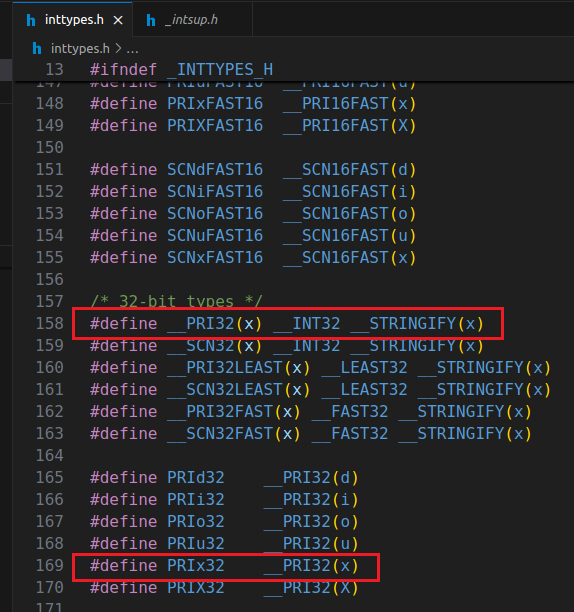
编译运行在NEMU上的NEMU时使用的是riscv32的交叉编译器,而运行在我们x86上的NEMU使用的是x86版本的编译器,对于uint32_t这种类型来说,上面这个报错说明riscv32编译器定义的是long unsigned int,所以需要加上长度修饰符l。对于这些类型的打印格式,最好使用inttype.h头文件中的可移植宏定义(PRIx32,PRIu32这种),它会根据不同平台来自动添加长度修饰符。下图是我找到的riscv32平台的inttypes.h中的定义以及最终展开的__INT32长度修饰符:
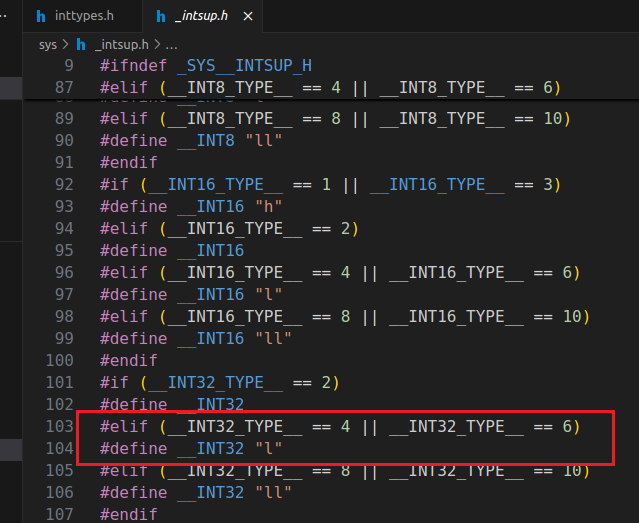
所以你实现的printf也要支持这些长度描述符